

Description
Download Toshl Finance – Personal Finance, Budgeting, Money Tracker
Overview
Toshl Finance is a comprehensive personal finance management tool designed to help users gain clarity and control over their financial habits. With over 2 million users worldwide, the software enables individuals to track spending, manage budgets, organize bills, and visualize financial data in an engaging and intuitive way. It is particularly suited for consumers seeking a fun yet effective method to monitor their income and expenses across multiple accounts and currencies.
The platform supports a wide range of real-world financial activities, including daily expense logging, recurring bill tracking, receipt storage, and cross-device synchronization. Whether managing household budgets, planning for future savings, or simply understanding where money goes each month, Toshl Finance offers tools to simplify financial oversight. Its unique blend of data visualization and gamified elements—such as “funky monster tips”—makes financial tracking less daunting and more interactive.
Developed by Toshl, the software has earned recognition from major publications like The New York Times and BBC, and was awarded The Europa Award for Best Commerce, Finance or Payments Startup. This credibility underscores its reliability and user-centric design. The software is accessible across Windows, Mac, Linux, iOS, Android, and web platforms, allowing seamless use across devices.
Key Features & Capabilities
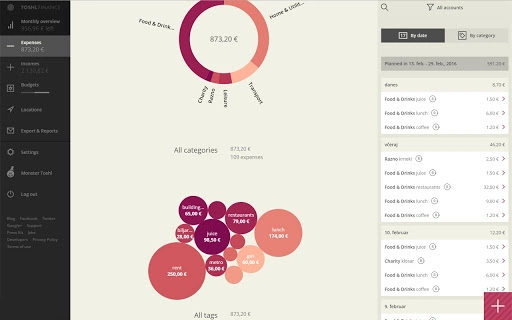
- Brilliant Data Visualizations: Offers monthly overviews through pie charts, bubble graphs, and an expense locations map to help users understand spending patterns and identify financial trends.
- Quick & Easy Expense Entry: Users can log expenses in just three seconds, with support for multiple currencies (165 available), automatic exchange rate updates, and optional tags, descriptions, photos, and reminders.
- Budgets with Alerts: Create unlimited budgets for categories, tags, or accounts, with customizable time periods and rollover options. Notifications alert users when they approach or exceed their budget limits.
- Bill Organizer: Schedule recurring expenses or income with customizable intervals and reminders before due dates, helping users avoid late payments.
- Receipt Photos (Toshl Pro): Capture and store up to four photos per expense, securely linked to the transaction data and backed up online.
- Multiple Financial Accounts: Manage cash, bank, credit card, PayPal, Bitcoin, and other accounts, each in any currency with individual balances and easy transfer capabilities.
- Location Tracking: Optionally save Foursquare venue data or GPS coordinates with transactions to visualize spending by location.
- Multi-Device Sync: Access your data across unlimited devices—Windows, Mac, Linux, iOS, Android, and web—with automatic syncing and backup.
- Web App Access: Use Toshl Finance on desktops or tablets via toshl.com, offering a larger screen experience without sacrificing functionality.
These features collectively support users in maintaining financial discipline while keeping the process enjoyable. For example, a user can snap a receipt, tag it with a category and location, and instantly see how it impacts their monthly budget—all within seconds. The integration of visual tools helps users spot spending leaks and adjust habits proactively.
User Interface, Workflow & Performance
The user interface of Toshl Finance is clean, modern, and designed with usability in mind. Navigation is straightforward, with a main dashboard providing immediate access to key metrics such as monthly spending, remaining budget, and upcoming bills. The layout emphasizes visual clarity, using color-coded charts and intuitive icons to guide users through financial data.
Workflow efficiency is a strong suit: entering expenses, setting budgets, and organizing bills can be completed in minimal steps. The addition of a tip calculator, optional repeat settings, and reminder systems enhances productivity. Users can customize their experience with optional features like location tagging and receipt storage, while maintaining a streamlined core process.
Performance details were not specified by the developer. However, based on general software behavior, the application appears optimized for responsiveness across platforms. The use of cloud synchronization suggests efficient background processing. The developer did not provide additional system requirements or resource usage details, but the 100 MB installation size indicates a lightweight footprint. Stability is likely maintained through regular updates and automatic backups.
Compatibility & System Requirements
Toshl Finance is compatible with Windows, Mac, Linux, iOS, Android, and web browsers, making it highly accessible across a broad range of devices. The software supports the latest versions of these platforms, though specific OS version requirements were not listed.
The installation size is 100 MB, which is modest for a full-featured finance application. This suggests efficient packaging and minimal disk space usage. The developer did not specify exact hardware requirements, such as RAM or CPU thresholds, nor did they outline minimum processor speeds or storage needs.
Platform compatibility information is limited to the listed operating systems. For users on older or less common systems, compatibility may vary. The web app version ensures access even on devices without native software, provided there is an internet connection.
Pros and Cons
Pros
- Free version offers robust functionality for personal finance tracking.
- Supports multiple currencies and automatic exchange rate updates.
- Intuitive interface with engaging visualizations and gamified elements.
- Seamless synchronization across unlimited devices and platforms.
- Web app allows full access from desktops and tablets.
- Receipt photo storage available with Pro subscription.
- Customizable budgets with alerts and rollover options.
Cons
- Advanced features like receipt storage require a paid Pro subscription.
- Exact system requirements and performance metrics were not provided.
- Some features (e.g., location tracking) are optional and may require manual enablement.
- Full functionality across all platforms may depend on internet connectivity.
- Pro subscription is required for unlimited accounts and budgets.
FAQ Section
Is Toshl Finance available for free?
Yes, Toshl Finance offers a fully functional free version with core features like two financial accounts, two budgets, and basic expense tracking. Additional features are unlocked via the Toshl Pro subscription.
Can I use Toshl Finance on multiple devices?
Yes, users can access their data on unlimited devices across Windows, Mac, Linux, iOS, Android, and the web. All data syncs automatically across platforms.
Is my data secure when using Toshl Finance?
Data is automatically backed up to toshl.com and encrypted during transmission. The developer emphasizes data safety, and the application does not share user information without consent.
Does Toshl Finance support offline usage?
While the core app functions with internet access, certain features like sync and cloud backup require connectivity. Offline use may be limited to viewing previously loaded data.
What is the difference between the free and Pro versions?
The free version includes basic tracking tools. Toshl Pro removes limitations, offering unlimited financial accounts, budgets, receipt photos, and enhanced customization. Pro is available via monthly or yearly subscription.
Final Thoughts
Toshl Finance stands out as a powerful, user-friendly tool for anyone looking to take control of their personal finances. Its engaging design, combined with practical features like real-time budgeting, receipt tracking, and multi-device sync, makes it ideal for both beginners and experienced users. The free version delivers strong value, while the Pro plan enhances functionality for those needing advanced tools.
Whether you're managing a tight household budget, tracking travel expenses, or simply aiming to spend smarter, Toshl Finance provides the clarity and motivation to make better financial decisions. The blend of visual analytics, automation, and cross-platform access ensures a smooth and consistent experience.
Download Toshl Finance now
Guides & Tutorials for Toshl Finance App for Chrome
How to install Toshl Finance App for Chrome
- Click the Preview / Download button above.
- Once redirected, accept the terms and click Install.
- Wait for the Toshl Finance App for Chrome download to finish on your device.
How to use Toshl Finance App for Chrome
This software is primarily used for its core features described above. Open the app after installation to explore its capabilities.
User Reviews for Toshl Finance App for Chrome 0
No reviews found





